This guide shows you how to launch a Dask gateway cluster for parallel and distributed computing.
What is Dask Gateway?
Dask Gateway allows users to launch clusters for scaling computations efficiently with more CPU and memory on cloud resources, without requiring direct access to the underlying Kubernetes backend of the 2i2c hub. Configuration, such as efficient cluster resourcing, authentication and security settings, is automatically handled for users to provide a consistent user experience across the hub.
Usage
This section roughly follows the Dask Gateway Docs – Usage together with the Training on Large Datasets example.
Connect to a dask-gateway server
Create a gateway client to communicate with the dask-gateway server.
from dask_gateway import Gateway
gateway = Gateway() # Uses values configured for the 2i2c Dask hub (recommended)Configure cluster options
Specify options for your gateway cluster with the options widget.
options = gateway.cluster_options()
options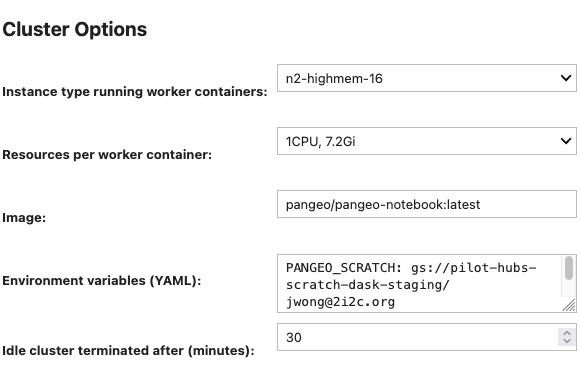
Cluster options
- Instance type running worker containers
- This defaults to the machine type
n2-highmem-16for Google Cloud andr5.4xlargefor AWS, with a maximum of 16 CPUs available. - Resources per worker container
- Select 1/2/4/8/16 CPUs and corresponding memory requests from a dropdown menu.
- Image
- This defaults to the user image deployed on the Dask hub.
- Environment variables (YAML)
- Set environment variables for both the workers and schedulers using YAML, e.g.
ENV_VAR: my_environment_variable. - Idle cluster terminated after (minutes)
- This defaults to 30 minutes. Consider cloud computing resources and costs for your hub when setting this value.
Create and scale gateway cluster
Pass the cluster options to a new gateway cluster.
cluster = gateway.new_cluster(options)
clusterManual scaling
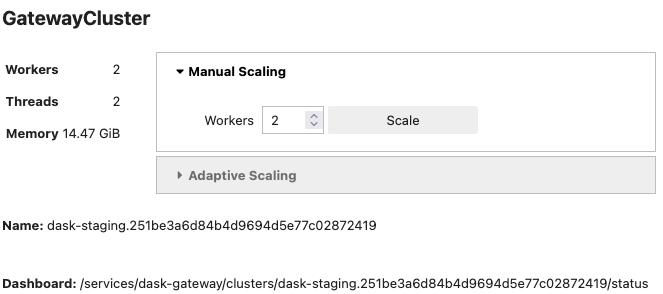
Manually scale the cluster size to a fixed number of workers.
Expand the Manual scaling dropdown in the cluster widget.
Select the number of workers.
Click Scale to confirm.
Adaptive scaling
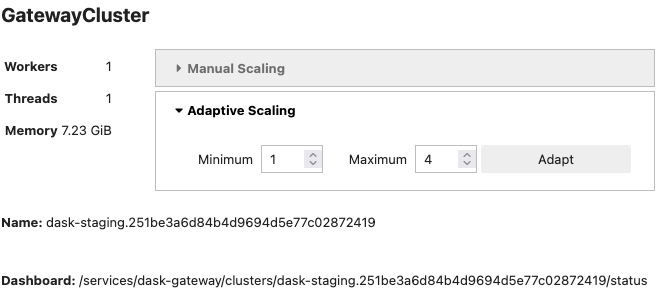
Adapt the cluster size dynamically based on current load. This helps to scale up the number of workers when necessary but scale it down and save resources when not actively computing.
Expand the Adaptive scaling dropdown in the cluster widget.
Select the minimum and maximum number of workers.
Click Adapt to confirm.
Connect to the gateway cluster
Connect to the gateway cluster to start doing work with your workers.
client = cluster.get_client()
client
Note the dashboard address of the form /services/dask-gateway/clusters/... to connect to the Dask dashboard later.
Connect Dask dashboard to Dask JupyterLab extension
Connect to a Dask dashboard to monitor computations with the JupyterLab extension.
Copy the dashboard address from Connect to the gateway cluster or from running the command
client.dashboard_linkClick the
 Dask icon in the left sidebar.
In the search box at the top of the panel, paste in the full dashboard URL of the form
https://<hub-name>.<community-name>.2i2c.cloud/<dashboard-address>Select the diagnostic plots to visualize, e.g. workers memory, CPU, task stream.
Run computations on the cluster
Import the Python packages for the Train Models on Large Datasets example.
import dask_ml.datasets
import dask_ml.cluster
import matplotlib.pyplot as plt
Generate random datasets for k-means clustering analysis.
X, y = dask_ml.datasets.make_blobs(n_samples=10000000,
                                   chunks=1000000,
                                   random_state=0,
                                   centers=3,)
X = X.persist()
X
Group the clusters with the k-means algorithm.
km = dask_ml.cluster.KMeans(n_clusters=3, init_max_iter=2, oversampling_factor=10)
km.fit(X)
Video showing dask dashboard while computing k-means clustering.
Plot the results.
fig, ax = plt.subplots()
ax.scatter(X[::10000, 0], X[::10000, 1], marker='.', c=km.labels_[::10000],
           cmap='viridis', alpha=0.25);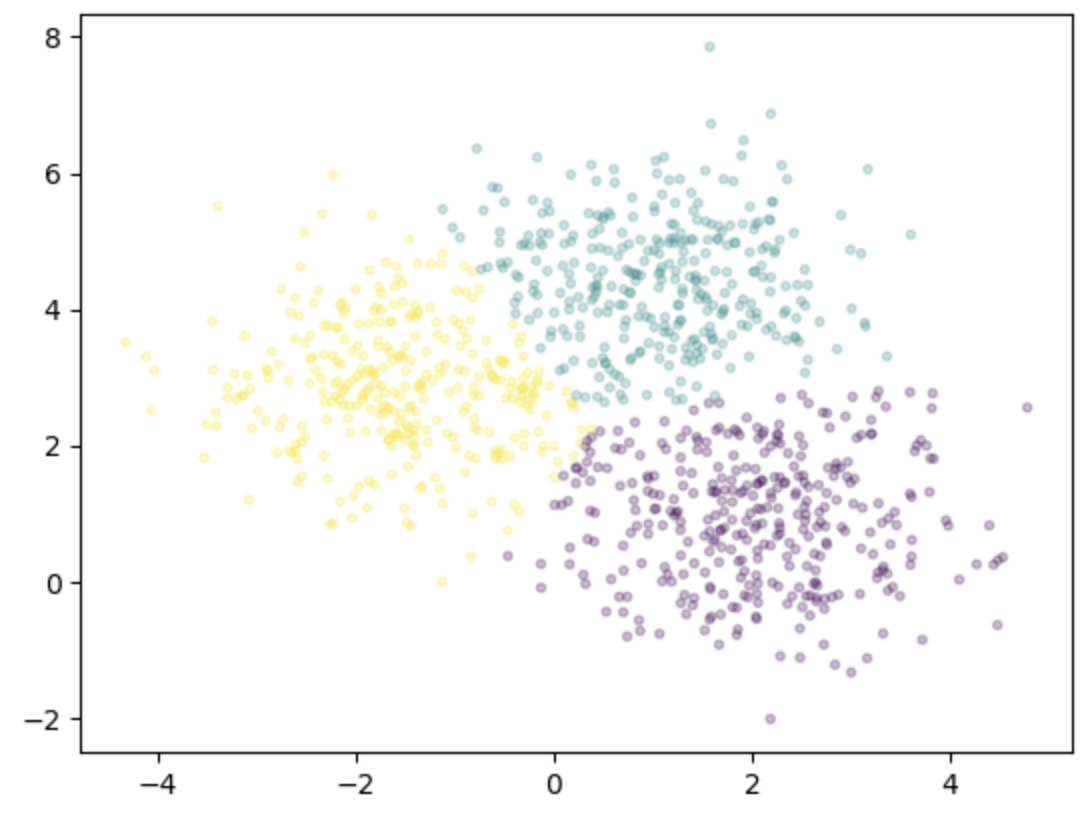
Shut down the cluster
Shut down the cluster when not in use to minimize the waste of computational resources and costs.
cluster.close()FAQs
What are the best practices for using Dask to scale computations?
Take a look at the Dask - Best Practices documentation for a guide to using Dask efficiently.
Why can’t I choose the instance type for my cluster?
The default is
n2-highmem-16for Google Cloud andr5.4xlargefor AWS, with a maximum of 16 CPUs available on each machine. These instance types are chosen so that there is a consistent node pool across all 2i2c Dask hubs and more efficient cluster resourcing.Should I use manual or adaptive scaling?
We suggest starting with adaptive scaling to dynamically scale up the number of workers when necessary but scale down and save resources when not actively computing. Once you are confident about your code’s performance, you can use the manual scaling for fine-grained control over the number of workers needed.
How do I choose the number of workers/resources per worker?
Like any other scaling problem, the answer to this question is specific to the application code. As suggested in the Dask - Best Practices, start with a small subset of your data and evaluate performance using the Dask dashboard before scaling resources to the full dataset.
Why are there limited options for CPU and memory resources per worker?
The limited options of 1/2/4/8/16 CPUs and associated memory requests are chosen to enable the most efficient use of the node pool available. Otherwise, for example, a user could accidentally request 51% of a machine’s resources per worker so only 1 worker can fit on an entire machine. In this example, if 2 workers were needed for the computation then this increases cloud costs for the 2 machines required while potentially leaving 49% of resources idle per machine.
Why did my kernel die?
There can be many reasons for this, but the most common one when it comes to Dask is an out-of-memory error caused by committing data into memory that exceeds the available RAM limit. Try using Dask to scale computations on smaller datasets and write the intermediate results to disk in the /tmp folder.
Which image should I use for the software environment?
A Dask supported user image that includes
dask-gatewayanddask-labextensionis available by default on a 2i2c Dask hub – this ensures compatability between the Dask user server, scheduler and workers. Thedask-gateway-serveris not required in the user image and is installed in the backend by 2i2c and maintained to the latest version.How do I install software packages to my Dask hub environment?
During code development, use the Dask distributed built-in scheduler plugin
PipInstallto pip install a set of packages on all Dask workers (see the Pangeo Dask Gateway tutorial for an example). However, this increases the time to start up each worker. During production, for best performance we advise adding the required software packages to the Pangeo Docker image, ensuring that the key packagedask-gatewayis included (anddask-labextensionif you require the Dask dashboard) – see Re-use and modify a community-maintained image for your hub (recommended) for guidance. Deploy your custom image to the hub by contacting 2i2c support or use The “Bring your own image” option in the image selection dropdown if available.